

Operating system: Windows, Android, macOS
Group of programs: Business automation

Automation for exhibitors
- Copyright protects the unique methods of business automation that are used in our programs.

Copyright - We are a verified software publisher. This is displayed in the operating system when running our programs and demo-versions.

Verified publisher - We work with organizations around the world from small businesses to large ones. Our company is included in the international register of companies and has an electronic trust mark.

Sign of trust
Quick transition.
What do you want to do now?
If you want to get acquainted with the program, the fastest way is to first watch the full video, and then download the free demo version and work with it yourself. If necessary, request a presentation from technical support or read the instructions.

WhatsApp
During business hours we usually respond within 1 minute
How to buy the program?
View a screenshot of the program
Watch a video about the program
Download demo version
Compare configurations of the program
Calculate the cost of software
Calculate the cost of the cloud if you need a cloud server
Who is the developer?
Program screenshot
A screenshot is a photo of the software running. From it you can immediately understand what a CRM system looks like. We have implemented a window interface with support for UX/UI design. This means that the user interface is based on years of user experience. Each action is located exactly where it is most convenient to perform it. Thanks to such a competent approach, your work productivity will be maximum. Click on the small image to open the screenshot in full size.
If you buy a USU CRM system with a configuration of at least “Standard”, you will have a choice of designs from more than fifty templates. Each user of the software will have the opportunity to choose the design of the program to suit their taste. Every day of work should bring joy!
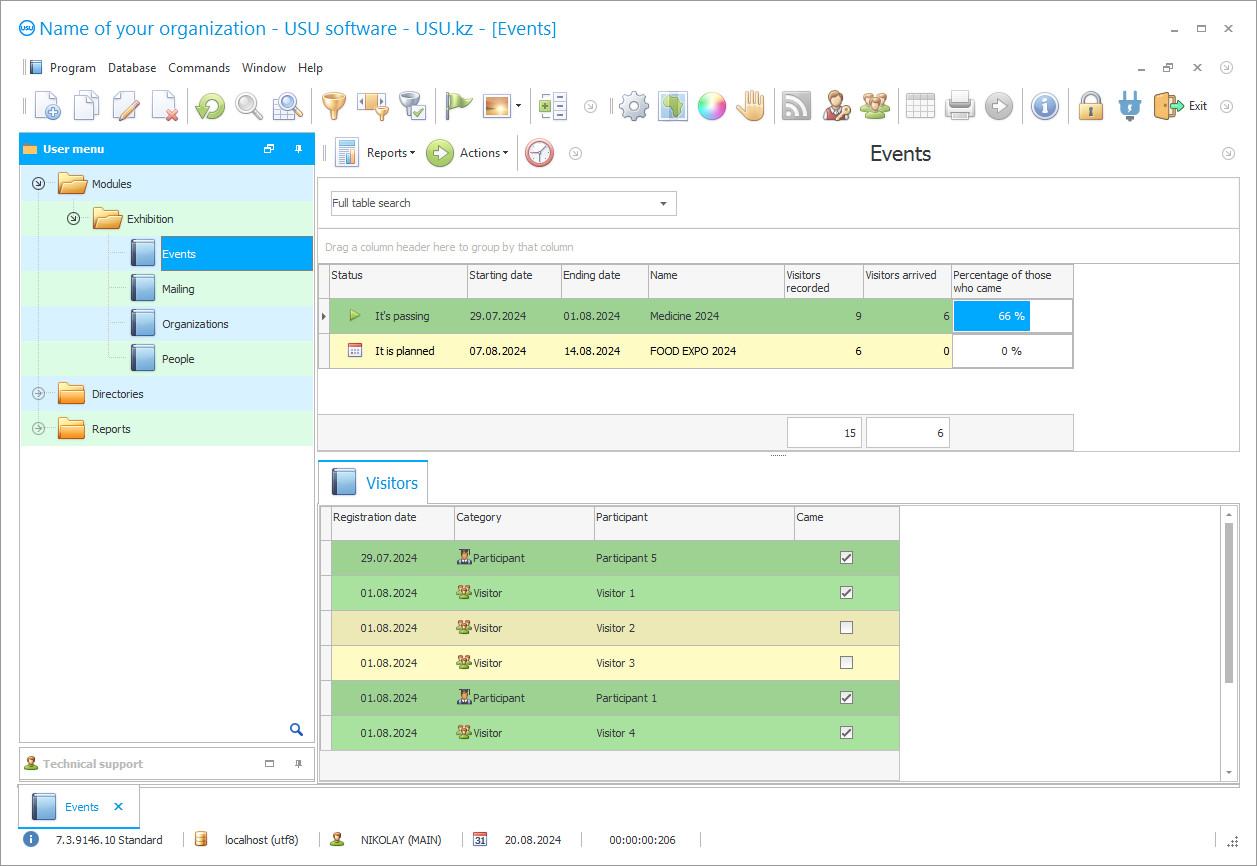
To be successful at exhibition events, automation for exhibitors is necessary, from submitting an application for participation and ending with the last day and collecting materials. There are many companies on the market that provide services for the automation of various processes and exhibitions, including, but how to choose a worthy and effective one so as not to waste time and money in vain. Let's first figure out why automation is needed specifically for exhibitors, after all, it would seem that they took part in the exhibition and that's all, but not everything is so simple for exhibitors during an exhibition event, it is necessary to reach a large target audience in order to expand their capabilities, productivity, to increase income, demand, profitability of the enterprise. To participate in exhibition events, you need to send a request for accreditation, find a company to organize the construction of stands, buy out places, plan work schedules, get access for certain employees who will participate in a significant event, calculate an estimate, analyze the demand, release promotional products and much more. To achieve automation of all business processes, specialized development is indispensable.
Our professional program "Universal Accounting System" makes it possible to cope with tasks of any plan, format and scale, due to modular content, flexible configuration settings and irreplaceable tools. Affordable price, it differs from similar applications that provide automation. Fully automated software is capable of delivering tremendous benefits by optimizing employees' working time, taking into account improved quality and capabilities. The functionality of the utility is configured in such a way that exhibitors can easily plan upcoming events, manage dates and opportunities, draw up a list of actors, and plan expendable resources. For each exhibitor, a personal number is provided, printed on the badge and read by an integrating barcode scanner at the checkpoint, from where the information on the exhibitor is entered into the database.
By automating the electronic system, you can quickly enter information into the program, save it when backed up on the server, import it, instantly receive it upon request and send it via SMS and e-mail. Also, it is possible to consolidate departments and branches, providing a single work for all employees who, under personal delegated rights, can enter a multi-user system.
Automation of the formation of documents and reports, allows you to build graphs and statistics, making it possible to monitor financial activities and analyze the conduct of events. It is possible to plan events, keep track of costs, compare the effectiveness of the event and the increase in customers, growth or decline in productivity.
In order not to be verbose, download the free demo version of the application and, first-hand, evaluate all the functionality and quality of development, analyze the scale and versatility. Regarding the installation of the licensed program, getting answers to the remaining questions, please contact the numbers below.
To optimize financial processes, control and simplify reporting, you will need a program for the exhibition from the USU company.
For improved control and ease of bookkeeping, trade show software can come in handy.
Keep records of the exhibition using specialized software that allows you to expand the reporting functionality and control over the event.
Automation of the exhibition allows you to make reporting more accurate and simpler, optimize ticket sales, and also take on some of the routine bookkeeping.
Who is the developer?

Akulov Nikolay
Expert and chief programmer who participated in the design and development of this software.
2026-09-23
Video of automation for exhibitors
This video is in Russian. We have not yet managed to make videos in other languages.

The USU system allows you to keep track of the participation of each visitor in the exhibition by checking tickets.
The formation of the database is carried out by fully automating business processes, with minimal involvement of labor and financial costs, increasing profitability.
The automated USU system can effectively build constructive relationships with exhibitors.
The search for the necessary materials and records can be performed by sampling according to certain criteria, reducing the search time to a couple of minutes.
Automation of data entry allows you to reduce time and get correct materials.
Import information is available from various media.
Personalization of accounting data for exhibitors.
The multi-user mode makes it possible to simultaneously get access to all employees for a single work with the infobase.
Differentiation of rights of use, protect information from strangers.
Download demo version
When starting the program, you can select the language.
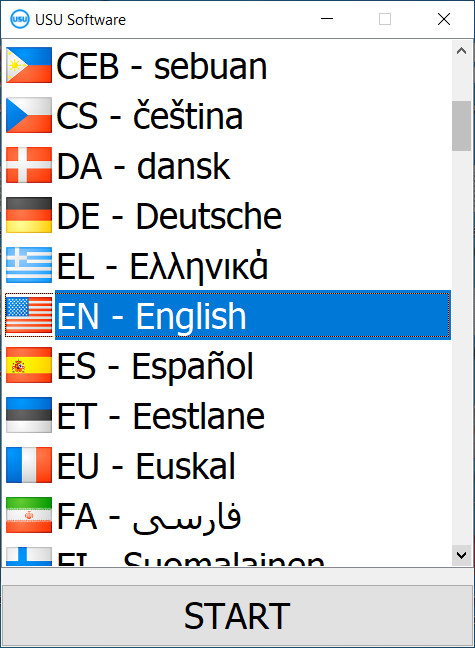
You can download the demo version for free. And work in the program for two weeks. Some information has already been included there for clarity.
Who is the translator?

Khoilo Roman
Chief programmer who took part in the translation of this software into different languages.
When backing up materials, the workflow will be reliably and long-term saved.
You can quickly get information on documents or an exhibitor by contextual search.
Calculation can be made by piece-rate or single payment.
Acceptance of payments is made in cash or non-cash form.
Any currency is accepted by conversion.
SMS notifications, e-mailing, are made automatically, in bulk or personally, notifying exhibitors and guests about the planned exhibitions.
Automation during online registration, on the organizer's website.
Automation of assignment of a personal number (barcode) to each visitor and exhibitor.
Electronic system for registering visitors to exhibition events.
Order an automation for exhibitors
To buy the program, just call or write to us. Our specialists will agree with you on the appropriate software configuration, prepare a contract and an invoice for payment.
How to buy the program?

Send details for the contract
We enter into an agreement with each client. The contract is your guarantee that you will receive exactly what you require. Therefore, first you need to send us the details of a legal entity or individual. This usually takes no more than 5 minutes

Make an advance payment
After sending you scanned copies of the contract and invoice for payment, an advance payment is required. Please note that before installing the CRM system, it is enough to pay not the full amount, but only a part. Various payment methods are supported. Approximately 15 minutes

The program will be installed
After this, a specific installation date and time will be agreed upon with you. This usually happens on the same or the next day after the paperwork is completed. Immediately after installing the CRM system, you can ask for training for your employee. If the program is purchased for 1 user, it will take no more than 1 hour

Enjoy the result
Enjoy the result endlessly :) What is especially pleasing is not only the quality with which the software has been developed to automate everyday work, but also the lack of dependency in the form of a monthly subscription fee. After all, you will only pay once for the program.
Buy a ready-made program


Also you can order custom software development
If you have special software requirements, order custom development. Then you won’t have to adapt to the program, but the program will be adjusted to your business processes!
Automation for exhibitors
The control is carried out when integrating with video cameras.
Remote access, activated for mobile work.
Program parameters can be changed at the request of users.
Modules are supplemented by developing their own personal ones.
Automation of office work accounting.
Analysis on the materials covered, on exhibitions, calculating the demand and interest.
Maintaining a single CRM database.
Manage data entry and export automation.
Automation of blocking materials when leaving the workplace.
Affordable price, one of the main differences from similar systems.