

Operating system: Windows, Android, macOS
Group of programs: Business automation

Management by exhibition visitors
- Copyright protects the unique methods of business automation that are used in our programs.

Copyright - We are a verified software publisher. This is displayed in the operating system when running our programs and demo-versions.

Verified publisher - We work with organizations around the world from small businesses to large ones. Our company is included in the international register of companies and has an electronic trust mark.

Sign of trust
Quick transition.
What do you want to do now?
If you want to get acquainted with the program, the fastest way is to first watch the full video, and then download the free demo version and work with it yourself. If necessary, request a presentation from technical support or read the instructions.

WhatsApp
During business hours we usually respond within 1 minute
How to buy the program?
View a screenshot of the program
Watch a video about the program
Download demo version
Compare configurations of the program
Calculate the cost of software
Calculate the cost of the cloud if you need a cloud server
Who is the developer?
Program screenshot
A screenshot is a photo of the software running. From it you can immediately understand what a CRM system looks like. We have implemented a window interface with support for UX/UI design. This means that the user interface is based on years of user experience. Each action is located exactly where it is most convenient to perform it. Thanks to such a competent approach, your work productivity will be maximum. Click on the small image to open the screenshot in full size.
If you buy a USU CRM system with a configuration of at least “Standard”, you will have a choice of designs from more than fifty templates. Each user of the software will have the opportunity to choose the design of the program to suit their taste. Every day of work should bring joy!
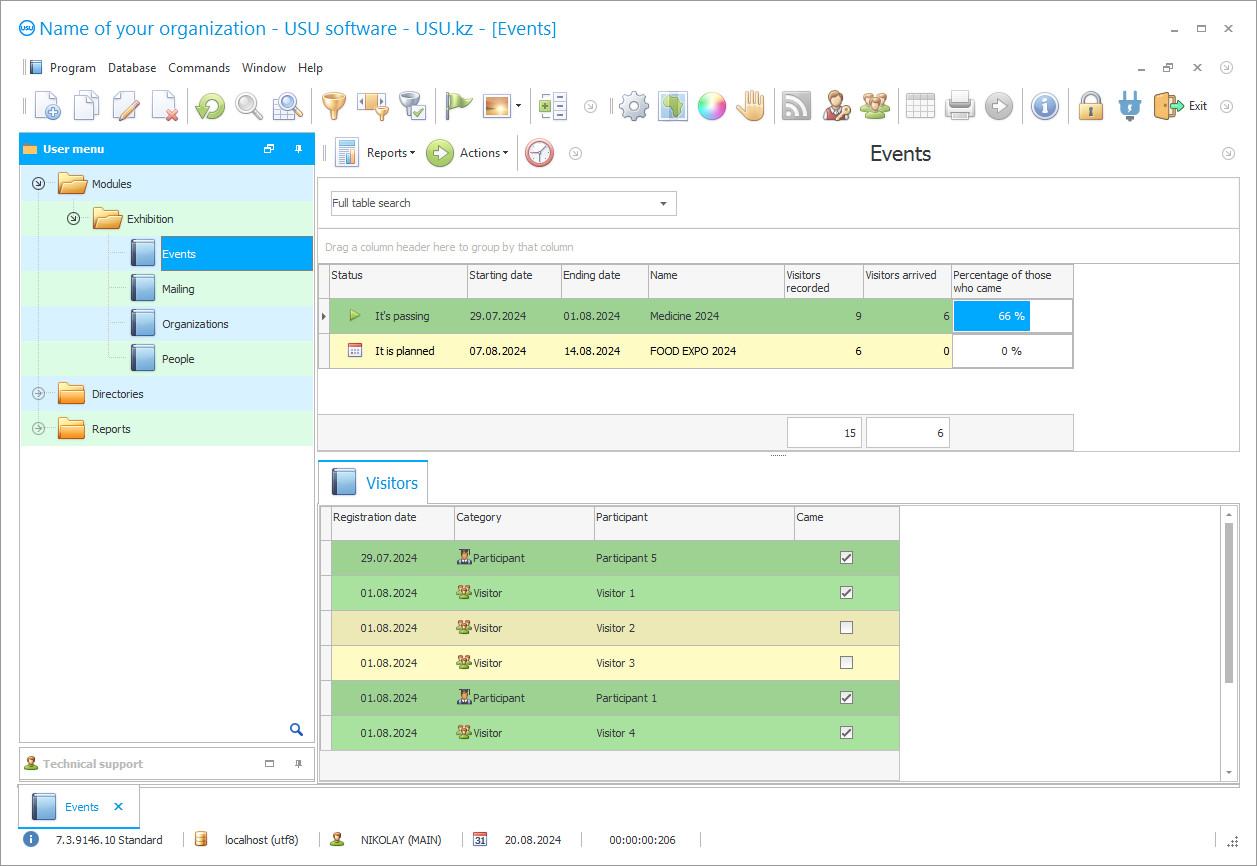
Organizations of exhibition events require automated management of exhibition visitors to maintain accurate accounting, control and analytics after certain events. To achieve competent management of exhibition visitors, a high-quality and multi-tasking program is needed, which on the market, from a large assortment of available ones, must be carefully selected, taking into account the differences of each presented system in the price range, functional and modular composition, in capabilities, etc. In order not to waste time, after all, all searches in any case will lead to our unique development, we will proudly present it in this article. So, our unique, automated program "Universal Accounting System" provides a personal approach to everyone, has a comprehensive tool for solving various problems, regardless of complexity, focus and volume. All processes of management, accounting and control are carried out automatically, optimizing the working time of employees. The low price of the exhibition visitor management system allows you to reduce financial costs. For each user, a personal type of work, functionality and modules are provided, which are selected personally by everyone. The public interface makes it possible to easily and quickly delve into the control system by customizing the functionality for yourself, customizing the language panel, decorating the desktop with a splash screen, selecting the necessary tables and magazines, setting up manual or automatic control of input, search or exhibition visitors.
The automated management of the program allows the management of exhibition visitors, so that the utility, adjusting to the activities and restrictions of the organization, controls the visitor's access to exhibitions, in accordance with the adopted measures and norms of the "black list" (prohibiting access to the exhibition). The unique management of the software makes it possible not to waste time on registering visitors at the reception, in offline mode entering information into the CRM electronic journals, which are automatically supplemented as various information is recorded. For example, at a checkpoint, barcode readers (assigned at registration to each visitor) are entered into a single database, indicating additional time and date details. Thus, the program reads the pass and prevents the visitor from entering the exhibition again using it. It is always quick and very convenient to register online, it is always quick and very convenient, the pass can be printed on any printer, taking into account the support of various document formats. Data transmission can be implemented through a local network or communication media (SMS, MMS, Mail, Viber). Information about upcoming exhibitions to visitors is carried out at a time, in large quantities, using a single client base, taking into account delimited parameters, i.e. at various exhibitions, invitations are sent depending on interest, age category, demand and profitability, on all days of exhibition events.
When managing exhibitions, video cameras are used that provide video reports through the online mode, for recording and managing working time, tracking various processes, both in terms of the activities of employees, and controlling the growth of visitors at the exhibition, analyzing various factors. The multitasking control program of the USU allows you to obtain comprehensive data on visitors, keeping statistics, generating reports, classifying a set of various filtering parameters. In the control system, it is possible to quickly set up the calculation of working hours and wages, forming a time sheet, making accurate readings for overtime and delays, business trips, sick leave, vacation leave. Increasing labor productivity through transparency in business operations.
Analyze the quality of the utility provided for consideration, possibly through a demo version, available completely free of charge from our official website. If you have any questions or need for advice, we are happy to assist in helping you upgrade your control system.
Keep records of the exhibition using specialized software that allows you to expand the reporting functionality and control over the event.
Automation of the exhibition allows you to make reporting more accurate and simpler, optimize ticket sales, and also take on some of the routine bookkeeping.
The USU system allows you to keep track of the participation of each visitor in the exhibition by checking tickets.
Who is the developer?

Akulov Nikolay
Expert and chief programmer who participated in the design and development of this software.
2026-09-23
Video of management by exhibition visitors
This video is in Russian. We have not yet managed to make videos in other languages.

For improved control and ease of bookkeeping, trade show software can come in handy.
To optimize financial processes, control and simplify reporting, you will need a program for the exhibition from the USU company.
Exhibition visitor management software, provides the creation of documentation and reporting, with an accurate determination of the exact number of reserved visitors and assigned tasks, receiving summaries for a specified period, designing work schedules, performing a comparative analysis with the exhibitions held.
Control over all technical operations.
Instant receipt of the desired materials is carried out by optimizing the resource consumption.
Managing the "black list of visitors", allows you to automatically recognize persons who are under a limited level.
The control system has a multichannel level, enabling employees to save instant work performance, exchanging information and driving information into a single database.
Download demo version
When starting the program, you can select the language.
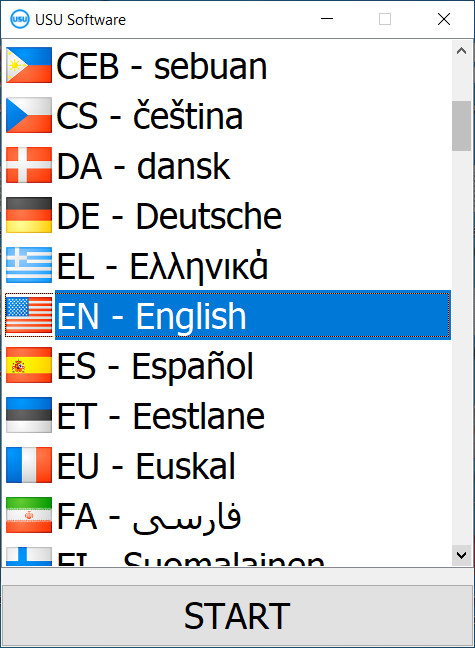
You can download the demo version for free. And work in the program for two weeks. Some information has already been included there for clarity.
Who is the translator?

Khoilo Roman
Chief programmer who took part in the translation of this software into different languages.
Management of a single base for all departments and branches.
Integration with instruments and applications.
Online registration provides a calm, fast and smooth process of activating personal data, receiving an individual barcode that provides visitors with access to the exhibition, when read at the checkpoint.
Each user, to manage the assigned tasks, is provided with a personal login and password.
By the numbers from the passes of visitors, who are read at the entrance to the exhibition, it is possible to track the influx and quantitative data of guests.
Electronic journals automatically receive information on exhibition visitors.
Automatic saving of documentation and information on the server of the organization.
Order a management by exhibition visitors
To buy the program, just call or write to us. Our specialists will agree with you on the appropriate software configuration, prepare a contract and an invoice for payment.
How to buy the program?

Send details for the contract
We enter into an agreement with each client. The contract is your guarantee that you will receive exactly what you require. Therefore, first you need to send us the details of a legal entity or individual. This usually takes no more than 5 minutes

Make an advance payment
After sending you scanned copies of the contract and invoice for payment, an advance payment is required. Please note that before installing the CRM system, it is enough to pay not the full amount, but only a part. Various payment methods are supported. Approximately 15 minutes
The program will be installed
After this, a specific installation date and time will be agreed upon with you. This usually happens on the same or the next day after the paperwork is completed. Immediately after installing the CRM system, you can ask for training for your employee. If the program is purchased for 1 user, it will take no more than 1 hour

Enjoy the result
Enjoy the result endlessly :) What is especially pleasing is not only the quality with which the software has been developed to automate everyday work, but also the lack of dependency in the form of a monthly subscription fee. After all, you will only pay once for the program.
Buy a ready-made program


Also you can order custom software development
If you have special software requirements, order custom development. Then you won’t have to adapt to the program, but the program will be adjusted to your business processes!
Management by exhibition visitors
Video control, forwards accurate video materials in real time, from showrooms, for control, management and analysis.
Delimitation of official powers.
In the application, you can really set any tasks, different in scope, range and complexity.
Work is distributed among employees.
Designing work schedules.
Extract reports and documents using templates and samples.
Demo version, used for detailed analysis and acquaintance with the unique capabilities programmed in the automated program.