

Operating system: Windows, Android, macOS
Group of programs: Business automation

Accounting of orders of the printing house
- Copyright protects the unique methods of business automation that are used in our programs.

Copyright - We are a verified software publisher. This is displayed in the operating system when running our programs and demo-versions.

Verified publisher - We work with organizations around the world from small businesses to large ones. Our company is included in the international register of companies and has an electronic trust mark.

Sign of trust
Quick transition.
What do you want to do now?
If you want to get acquainted with the program, the fastest way is to first watch the full video, and then download the free demo version and work with it yourself. If necessary, request a presentation from technical support or read the instructions.

WhatsApp
During business hours we usually respond within 1 minute
How to buy the program?
View a screenshot of the program
Watch a video about the program
Download demo version
Compare configurations of the program
Calculate the cost of software
Calculate the cost of the cloud if you need a cloud server
Who is the developer?
Program screenshot
A screenshot is a photo of the software running. From it you can immediately understand what a CRM system looks like. We have implemented a window interface with support for UX/UI design. This means that the user interface is based on years of user experience. Each action is located exactly where it is most convenient to perform it. Thanks to such a competent approach, your work productivity will be maximum. Click on the small image to open the screenshot in full size.
If you buy a USU CRM system with a configuration of at least “Standard”, you will have a choice of designs from more than fifty templates. Each user of the software will have the opportunity to choose the design of the program to suit their taste. Every day of work should bring joy!
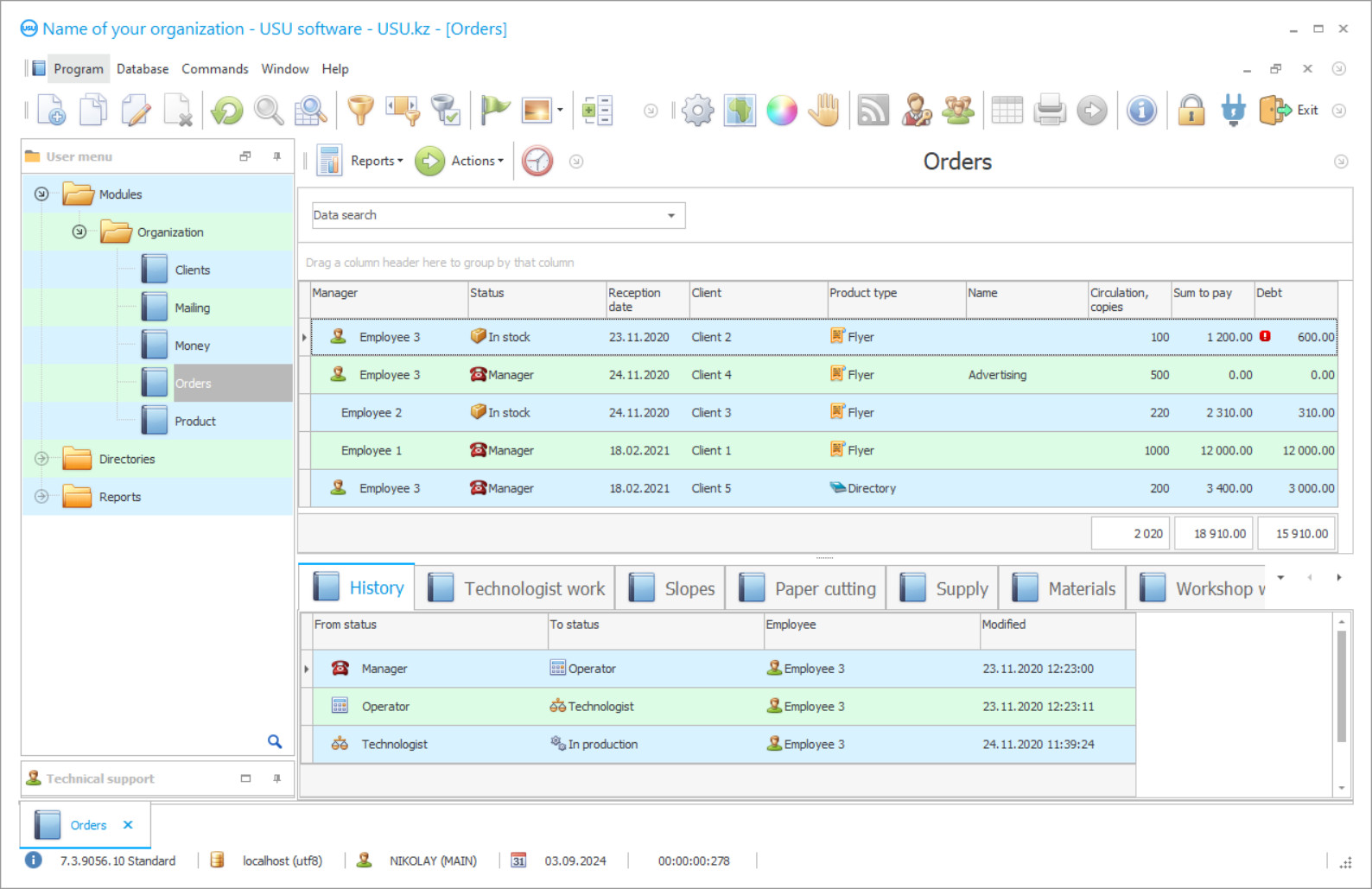
Specialized orders accounting in the printing house is used more and more often. It is easy to explain by efficiency and productivity, the quality of organization and coordination of management levels, the affordability of automation projects, and a large volume of software analytical work. At the same time, the configuration is famous not only suits operational and technical accounting and the quality of information support but also takes over the position of material supply, performs preliminary calculations, monitors both finished printed products and production resources.
Several functional projects and solutions have been released on the site of the USU Software system according to the requests of the printing industry, whose task is to automate the accounting of orders in the printing house. Firms have no problem finding the most suitable application. They are not considered difficult. To ordinary users, a couple of practical exercises are enough to understand the organization and coordination of management levels, learn how to work with information accounting, reference books, and catalogs, track orders in real-time.
It is no secret that the digital organization of order accounting in a printing house is built on prompt preliminary calculations when users can not only determine the final cost of a new application but also immediately reserve materials (paint, paper, film) according to its execution. One of the most important tasks facing automation is communication with customers. Users will be able to use SMS to warn clients about the need to pay to the services of a printing organization, inform that the printed matter is ready or share advertising information.
Who is the developer?

Akulov Nikolay
Expert and chief programmer who participated in the design and development of this software.
2026-09-23
Video of accounting of orders of the printing house

Do not forget about the ability to effectively manage orders, where every action is regulated by an automation system. It was originally designed with the comfort of day-to-day operation in mind, to work on current issues and plan the next steps at the same time. The printing house will get rid of the need to pore over-analytical long-time reports, while the regulated document flow of the organization can be completely put in order in a matter of moments. All the necessary forms, samples, and templates of regulatory documentation are registered in the registers of the program.
Talking about the items of material supply, a full-fledged warehouse accounting provides all possible assistance, which allows tracking the movement of both finished printed products and production materials. Automation does not exclude the use of devices and devices of the warehouse spectrum. As a result, typography becomes easier to manage. For each of the orders, it is easy to request analytics summaries, study the latest data, financial indicators, and raise archives. If we are talking about a whole network of printing organizations, then the software connects production departments, branches, and divisions.
Nothing is surprising in the fact that modern printing houses are striving to acquire automated accounting as soon as possible to more efficiently use resources, manage orders, manage staff employment, improve service quality, and raise productivity indicators. At the same time, the configuration is also productive in terms of substantive analytical work, where you can carefully study the current performance of the company, develop a development strategy for the future, identify weaknesses and make adjustments. The site contains a demo version of the program.
Download demo version
When starting the program, you can select the language.
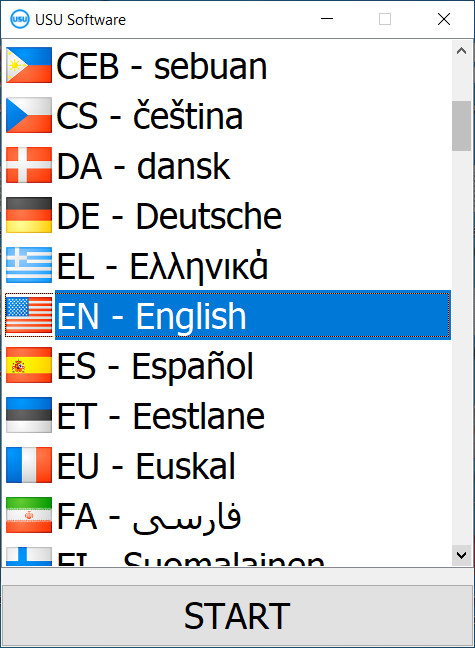
You can download the demo version for free. And work in the program for two weeks. Some information has already been included there for clarity.

Who is the translator?

Khoilo Roman
Chief programmer who took part in the translation of this software into different languages.
The digital assistant automatically monitors key levels of management of the printing house, allocates production resources, tracks current orders, and deals with documents.
It is allowed to independently configure the parameters of operational and technical accounting to comfortably work with information catalogs and reference books, to control all important processes and operations.
The automation project is very efficient in terms of planning. Turnkey, you can get a functionally advanced scheduler.
Order an accounting of orders of the printing house
To buy the program, just call or write to us. Our specialists will agree with you on the appropriate software configuration, prepare a contract and an invoice for payment.
How to buy the program?

Send details for the contract
We enter into an agreement with each client. The contract is your guarantee that you will receive exactly what you require. Therefore, first you need to send us the details of a legal entity or individual. This usually takes no more than 5 minutes

Make an advance payment
After sending you scanned copies of the contract and invoice for payment, an advance payment is required. Please note that before installing the CRM system, it is enough to pay not the full amount, but only a part. Various payment methods are supported. Approximately 15 minutes

The program will be installed
After this, a specific installation date and time will be agreed upon with you. This usually happens on the same or the next day after the paperwork is completed. Immediately after installing the CRM system, you can ask for training for your employee. If the program is purchased for 1 user, it will take no more than 1 hour

Enjoy the result
Enjoy the result endlessly :) What is especially pleasing is not only the quality with which the software has been developed to automate everyday work, but also the lack of dependency in the form of a monthly subscription fee. After all, you will only pay once for the program.
Buy a ready-made program


Also you can order custom software development
If you have special software requirements, order custom development. Then you won’t have to adapt to the program, but the program will be adjusted to your business processes!
Accounting of orders of the printing house
The organization of SMS communication is implemented quite simply to quickly learn how to notify customers that an application is ready, share advertising messages, and remind them about payment for services. Workflow accounting allows using the autocomplete function so as not to waste extra time filling out standard forms, contracts, or regulations. The program will do everything.
Information on current orders is easy to display on the screen. Users will not have a problem instantly make adjustments to any of the processes. The printing house gets rid of the need to pore over preliminary calculations for a long time to immediately determine the final cost of printed products and reserve materials for production in advance. With automation, costs are controlled more closely. The structure will be able to really reduce expenditure items, significantly save on paper, paint, film, and other material items. Integration of the software with a web resource is not excluded, which will allow you to quickly upload information to the site.
By default, the configuration is equipped with multifunctional inventory control to track the movement of both finished printed products and materials for its production. If the current results of the printing house leave much to be desired, there has been an increase in costs and a drop in profits, then software intelligence report this first.
In general, order management becomes much easier when each production step is automatically adjusted. The automation system act as a single information center when it is necessary to connect production departments, specialized printing services, branches, and divisions. Unique solutions with an extended functional range are produced on a turnkey basis. The spectrum includes exceptional options and possibilities outside of the basic equipment.
For a trial period, it is recommended to use the demo version of the application.