

Operating system: Windows, Android, macOS
Group of programs: Business automation

Information about remote work
- Copyright protects the unique methods of business automation that are used in our programs.

Copyright - We are a verified software publisher. This is displayed in the operating system when running our programs and demo-versions.

Verified publisher - We work with organizations around the world from small businesses to large ones. Our company is included in the international register of companies and has an electronic trust mark.
Sign of trust
Quick transition.
What do you want to do now?
If you want to get acquainted with the program, the fastest way is to first watch the full video, and then download the free demo version and work with it yourself. If necessary, request a presentation from technical support or read the instructions.

WhatsApp
During business hours we usually respond within 1 minute
How to buy the program?
View a screenshot of the program
Watch a video about the program
Download demo version
Compare configurations of the program
Calculate the cost of software
Calculate the cost of the cloud if you need a cloud server
Who is the developer?
Program screenshot
A screenshot is a photo of the software running. From it you can immediately understand what a CRM system looks like. We have implemented a window interface with support for UX/UI design. This means that the user interface is based on years of user experience. Each action is located exactly where it is most convenient to perform it. Thanks to such a competent approach, your work productivity will be maximum. Click on the small image to open the screenshot in full size.
If you buy a USU CRM system with a configuration of at least “Standard”, you will have a choice of designs from more than fifty templates. Each user of the software will have the opportunity to choose the design of the program to suit their taste. Every day of work should bring joy!
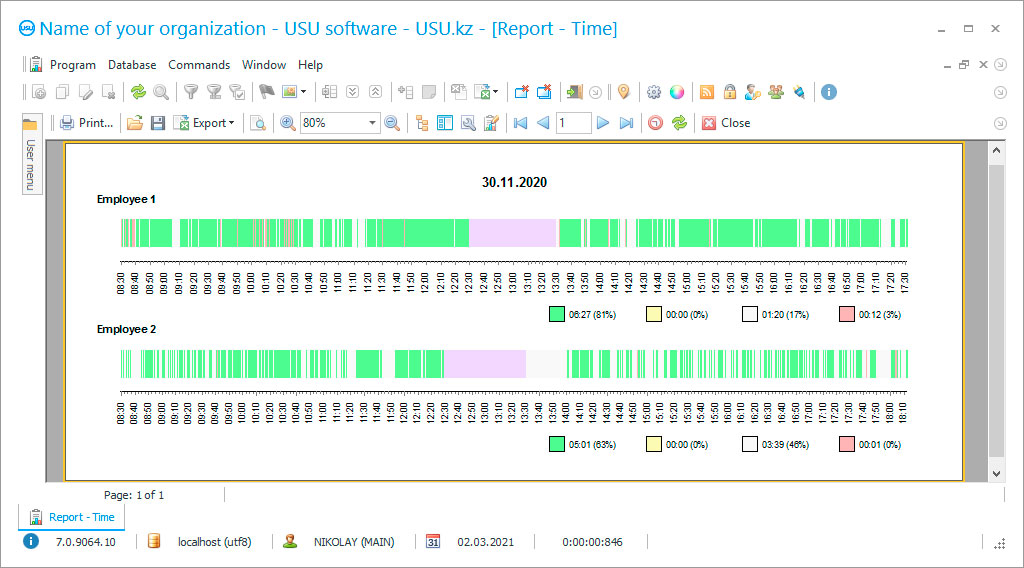
It is not enough to simply transfer employees to remote work, it is necessary to provide effective management tools since information about the work of employees at a remote location can only be obtained with the implementation of additional accounting software. While the specialists were in the office, management and monitoring could be organized directly in the company; the issue of automation of processes was not so simple when the workers perform their duties remotely. The Internet is becoming the only link between management and subordinates, but it is not enough just to establish total control, supervision over the remote work, specialized information-gathering tools are required in order to process incoming information, create reports, official forms, action algorithms, and analytic information. In fact, high-quality software becomes the manager's right hand, taking on some functions, facilitating monitoring tasks, but at the same time helping staff to accurately perform their duties, adhere to the work schedule even in remote conditions.
In order to get an effect, it is possible only in the case of installing information gather application that supports an integrated approach to automation, as does the USU Software. Extensive experience, constant improvement of the development made it possible to make the development in demand regardless of the field of activity, the scale of the company, or the form of ownership. The USU Software is capable of adapting to any remote work management task, satisfying a wide variety of needs for various enterprises that are engaged in remote work procedures.
Who is the developer?

Akulov Nikolay
Expert and chief programmer who participated in the design and development of this software.
2026-09-23
Video of information about remote work

Configuration of the user interface and a set of functions are determined after agreeing on working nuances, forming a technical assignment based on the information collected during the analysis. As a result, you’ll receive fully adapted software, which ensures a quick start, and the results from automation will be visible from the first weeks of active use. To use our application, you do not need to have any exceptional experience with information control tools, even the most inexperienced staff member can handle working with it, because the user interface is built on the principle of creating the most understandable design for users of all experience levels.
In order to make remote work a full-fledged and viable option for remote completion of various tasks, it is necessary to set up the mechanisms of interaction between employees, algorithms for the implementation of each process, the introduction of new information, and their documentation. These remote work operations can be carried out after the installation of the information analytic software developed by the specialists of the USU Software development team, but if it becomes necessary, users themselves can make changes to them if they have certain access rights.
Download demo version
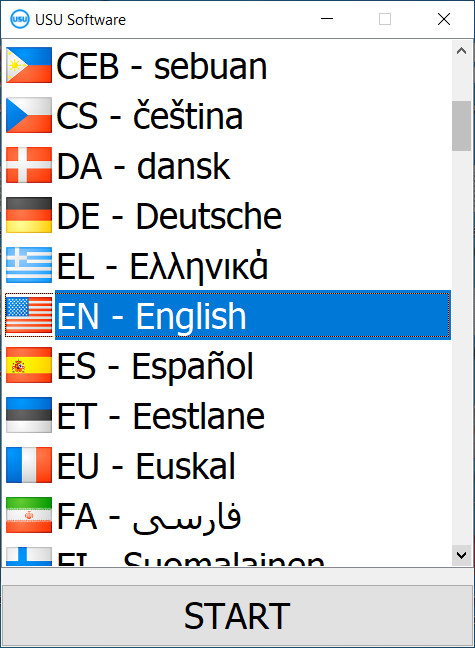
When starting the program, you can select the language.
You can download the demo version for free. And work in the program for two weeks. Some information has already been included there for clarity.
Who is the translator?

Khoilo Roman
Chief programmer who took part in the translation of this software into different languages.
Each specialist can use only the information and options that are required by the position, the rest is hidden from the access rights of employees. The business owner or department head receives reports on each subordinate every day, which reflects the completed tasks, performance indicators. At any time, you can check the current processes on the employee's computer, get screenshots for the last ten minutes. To exclude the temptation to use third-party entertainment programs during working hours, a blacklist is created, which is can be easily configured as well. Thus, you will always have up-to-date information about performing the remote work, devoting more time to developing your business. Over time, the existing functionality may not be enough, therefore we have provided the possibility of an upgrade if such a need arises.
Due to the absence of high requirements for the technical parameters of the equipment for installing the application, you will not need to incur additional financial expenses. The versatility of the configuration lies in its adaptive capabilities; it will suit any type of activity, regardless of its scale. The filling of modules, settings of algorithms, and templates depending on the needs of entrepreneurs, the nuances of doing business. In order to master the development process not only quickly, but also effectively, we have provided a short training course. The operation of the software does not imply the need to make monthly payments, you pay only for licenses, remote work hours of specialists.
Order an information about remote work
To buy the program, just call or write to us. Our specialists will agree with you on the appropriate software configuration, prepare a contract and an invoice for payment.
How to buy the program?

Send details for the contract
We enter into an agreement with each client. The contract is your guarantee that you will receive exactly what you require. Therefore, first you need to send us the details of a legal entity or individual. This usually takes no more than 5 minutes

Make an advance payment
After sending you scanned copies of the contract and invoice for payment, an advance payment is required. Please note that before installing the CRM system, it is enough to pay not the full amount, but only a part. Various payment methods are supported. Approximately 15 minutes
The program will be installed
After this, a specific installation date and time will be agreed upon with you. This usually happens on the same or the next day after the paperwork is completed. Immediately after installing the CRM system, you can ask for training for your employee. If the program is purchased for 1 user, it will take no more than 1 hour

Enjoy the result
Enjoy the result endlessly :) What is especially pleasing is not only the quality with which the software has been developed to automate everyday work, but also the lack of dependency in the form of a monthly subscription fee. After all, you will only pay once for the program.
Buy a ready-made program


Also you can order custom software development
If you have special software requirements, order custom development. Then you won’t have to adapt to the program, but the program will be adjusted to your business processes!
Information about remote work
You can adjust the length of the official breaks and the working hours, and the platform will adapt to it. The processing of incoming information will be carried out in accordance with the current regulations, without limiting the storage period. The transition to the remote type of work will go smoothly with customizing each action, defining the order of cooperation, and evaluating the effectiveness of each worker. In order for employees to instantly find any information, a context menu is provided, where it is necessary to enter several characters. Programmatic control of personnel will allow auditing, identifying effective employees, and applying the company's motivational policy. Thanks to the ability to receive daily reports, you will always be aware of the latest events, react on time.
The multi-user mode will help to maintain high performance even under maximum load. In case of a hardware malfunction, you’ll always have a backup copy of the database, helping to restore all the information that otherwise could’ve been forever lost. We always stay in contact with our customers, ready to provide technical support at any time that is convenient for you!