

Operating system: Windows, Android, macOS
Group of programs: Business automation

Management of storage
- Copyright protects the unique methods of business automation that are used in our programs.

Copyright - We are a verified software publisher. This is displayed in the operating system when running our programs and demo-versions.

Verified publisher - We work with organizations around the world from small businesses to large ones. Our company is included in the international register of companies and has an electronic trust mark.

Sign of trust
Quick transition.
What do you want to do now?
If you want to get acquainted with the program, the fastest way is to first watch the full video, and then download the free demo version and work with it yourself. If necessary, request a presentation from technical support or read the instructions.

WhatsApp
During business hours we usually respond within 1 minute
How to buy the program?
View a screenshot of the program
Watch a video about the program
Download demo version
Compare configurations of the program
Calculate the cost of software
Calculate the cost of the cloud if you need a cloud server
Who is the developer?
Program screenshot
A screenshot is a photo of the software running. From it you can immediately understand what a CRM system looks like. We have implemented a window interface with support for UX/UI design. This means that the user interface is based on years of user experience. Each action is located exactly where it is most convenient to perform it. Thanks to such a competent approach, your work productivity will be maximum. Click on the small image to open the screenshot in full size.
If you buy a USU CRM system with a configuration of at least “Standard”, you will have a choice of designs from more than fifty templates. Each user of the software will have the opportunity to choose the design of the program to suit their taste. Every day of work should bring joy!
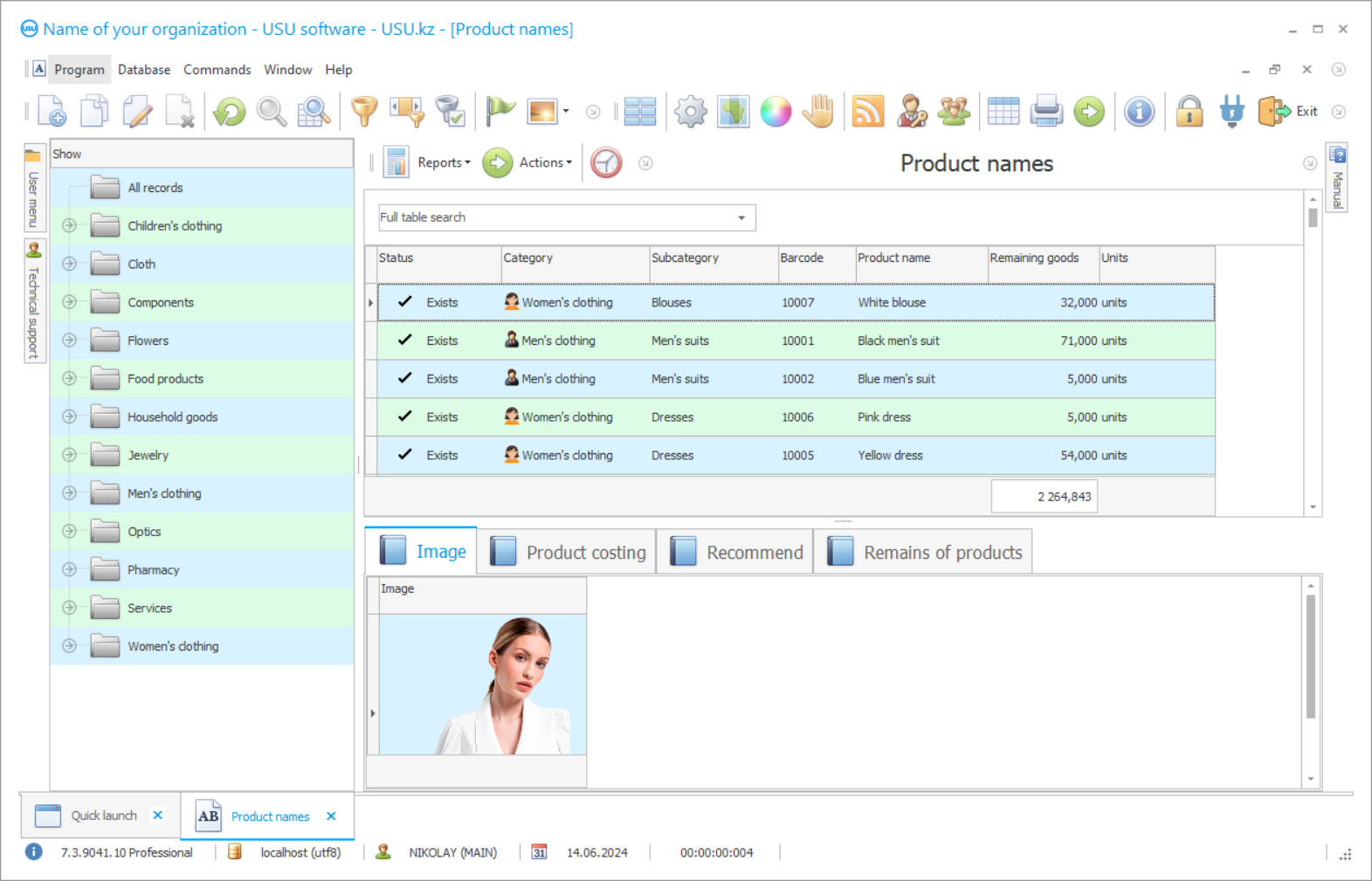
Warehousing management performs the function of ensuring a continuous and rhythmic movement of stocks to the consumption area. The tasks of storage management include the following functions: ensuring adequate space, placing stocks, creating the necessary conditions, guarding, keeping records of stocks, managing the movement and movement of stocks, providing specialized equipment.
The storage process is carried out after the receipt of stocks for storage. Further, the placement of items is carried out, taking into account the necessary mode and conditions for storage, tracking and care. Liable employees are responsible for the safety and integrity of the goods during storage. The goods are distributed for placement according to product characteristics, for example, consumer goods in the form of food products have their own parameters and storage conditions, which must be taken into account in order to ensure the safety and maintain the quality of the items. At the same time, the warehouses must maintain the required temperature regime and the permissible level of humidity, comply with all sanitary and hygienic standards, paying attention to the 'commodity neighbourhood'.
Who is the developer?

Akulov Nikolay
Expert and chief programmer who participated in the design and development of this software.
2026-09-23
Video of management of storage

'Commodity neighbourhood' refers to the consideration of the location of items, whose interaction may cause a loss of quality. For example, sugar or flour cannot be stored with goods with high moisture content, since these goods easily absorb moisture.
The organization of storage management has a difficult complex structure, in which many nuances must be taken into account. Among other things, providing storage carries a lot of financial costs, both for the maintenance of the warehouse and for labor costs. With an insufficient volume of turnover and sales, such storage can cause an unprofitable state of the enterprise. In this case, a lot depends on how correctly and efficiently the warehouse management system is organized. It's not only about storage.
Download demo version
When starting the program, you can select the language.
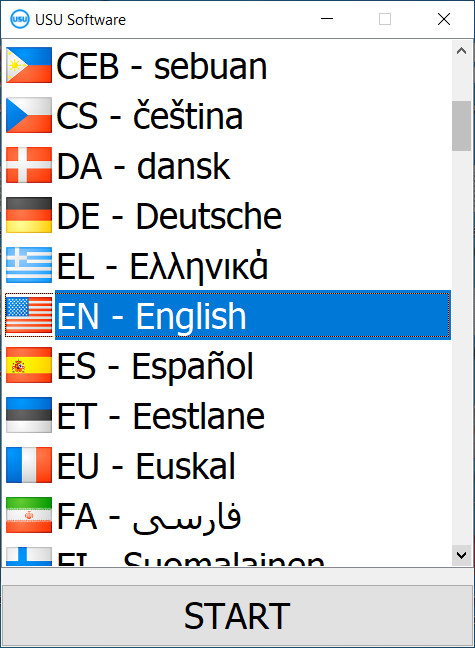
You can download the demo version for free. And work in the program for two weeks. Some information has already been included there for clarity.

Who is the translator?

Khoilo Roman
Chief programmer who took part in the translation of this software into different languages.
Unfortunately, not every company can boast of a functioning management structure. However, nowadays there are many ways to achieve efficiency without attracting labor. In the age of new technologies, automated programs have become reliable companions for almost every business, regardless of the field of activity. Whereas earlier similar programs were mostly used in relation to accounting activities, now they do not bypass management either.
An automated program for storage management allows you rationally and efficiently managing the order of storage in the warehouse, not only ensuring the efficiency of the process but also helping to reduce the cost of maintenance and labor. The USU Software is a modern automation system, due to the functionality of which the optimization of the working activity of any enterprise is achieved. The USU-Soft applies in many spheres of activity, without division according to any criteria. The development of the program is carried out with the determination of the preferences and needs of the organization, therefore the functional set in the USU Software can be adjusted. The use of the program does not limit users to a certain level of technical skills, thus it is suitable for everyone.
Order a management of storage
To buy the program, just call or write to us. Our specialists will agree with you on the appropriate software configuration, prepare a contract and an invoice for payment.
How to buy the program?

Send details for the contract
We enter into an agreement with each client. The contract is your guarantee that you will receive exactly what you require. Therefore, first you need to send us the details of a legal entity or individual. This usually takes no more than 5 minutes

Make an advance payment
After sending you scanned copies of the contract and invoice for payment, an advance payment is required. Please note that before installing the CRM system, it is enough to pay not the full amount, but only a part. Various payment methods are supported. Approximately 15 minutes
The program will be installed
After this, a specific installation date and time will be agreed upon with you. This usually happens on the same or the next day after the paperwork is completed. Immediately after installing the CRM system, you can ask for training for your employee. If the program is purchased for 1 user, it will take no more than 1 hour

Enjoy the result
Enjoy the result endlessly :) What is especially pleasing is not only the quality with which the software has been developed to automate everyday work, but also the lack of dependency in the form of a monthly subscription fee. After all, you will only pay once for the program.
Buy a ready-made program


Also you can order custom software development
If you have special software requirements, order custom development. Then you won’t have to adapt to the program, but the program will be adjusted to your business processes!

Management of storage
As we have already mentioned, the main features of storage management software include many useful functions. First of all, the USU-Soft provides for the choice of absolutely any language, including the ability to work with several language groups at once. Storage management allows classifying products as you like, and you can also save an image of each product using your webcam. In the future, the image will be displayed during the sale. The process of managing the availability of goods in storage is also simplified especially for you. The program will notify the necessary employees about important processes or tasks.
The management of daily work with goods takes place in special modules of the program. They can also mark goods’ receipt, transfer, availability, or sale. Eventually, you will accumulate a lot of information, since dozens of different actions can be performed with the product per day. The intelligent program for storage managing the USU-Soft does not overwhelm you with unnecessary details. It displays a search on the screen, where you can find the info you need about the storage at the moment. If you understand that a new product has appeared, while looking at the information, and it is missing in the system, you can easily add it to the program. You just need to indicate the storage to which the item came. Then you can set the rest of the information on the invoice. All goods are selected from the catalog of the nomenclature which is already known to you, which simplifies the task of searching it.
There is no more need to waste time on routine operations. The entire storage management process takes just two mouse clicks. When a list of all goods is automatically created, you can immediately indicate the availability and the purchase of goods. Thanks to a well-thought-out USU Software system for the management of storage since you can always trace the history of changes in the warehouse, as well as check the correctness of all calculations and a product cancellation.
Using the capabilities of the management module of the multifunctional USU-Soft system, you can get rid of all routine operations by automating the entire warehouse accounting of the enterprise. Thereby, you can reduce the time for processing goods and warehouse operations, as well as significantly increasing the efficiency of the entire company. The management of storage will be simpler with the USU-Soft system that has been specially developed for storage managing.